Groom and Bride SVG Cut Files for Custom Tees
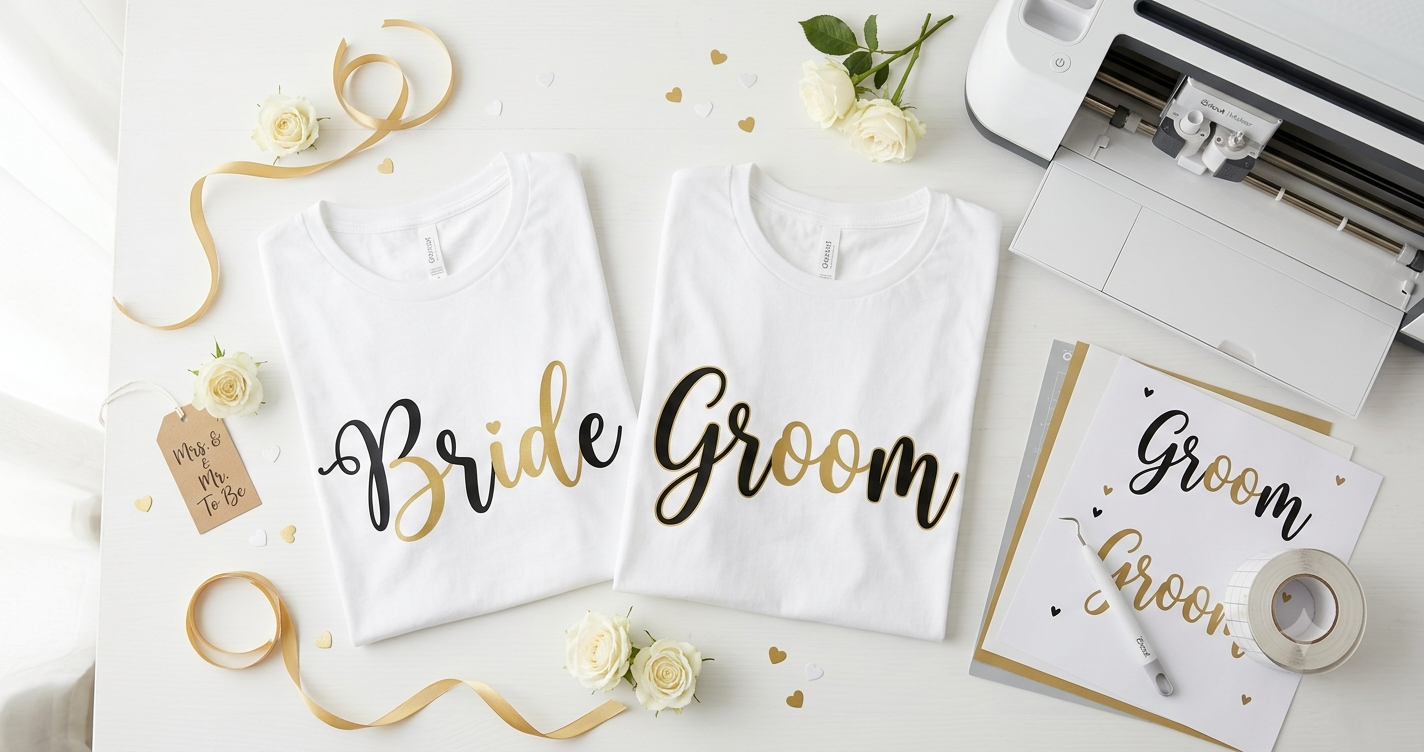
In this tutorial, you’ll learn how to create custom tees using groom and bride SVG files with your Cricut or Silhouette machine. By the end, you’ll have personalized t-shirts perfect for weddings, bridal showers, or engagement parties. The process involves using cutting files to design and cut vinyl that can be applied to any fabric item, giving you the opportunity to make unique wedding-related apparel.
Part of our complete Wedding SVG Files for Cricut guide.
💡 Looking for the best groom and bride SVG? Browse thousands of premium designs on Creative Fabrica — new designs added daily!
💡 Buyer’s Tip: Before downloading any SVG, check that the file
includes clean layers compatible with Cricut Design Space and
Silhouette Studio. Quality files on Creative Fabrica always specify
this in the product description.
What You’ll Need
- Cricut or Silhouette cutting machine
- Groom and bride SVG files
- Heat transfer vinyl (HTV) in desired colors
- Weeding tool and cutting mat
- Heat press or iron
How to Create Custom Groom and Bride Tees — Step by Step
- Download SVG Files: Begin by downloading your preferred groom and bride SVG files from a reliable source. Make sure these files are compatible with your cutting machine software.
- Upload to Software: Open your Cricut Design Space or Silhouette Studio. Use the ‘Upload’ feature to import the SVG files into your project.
- Resize and Customize: Adjust the size of the SVG files to fit the dimensions of your tee. You can also customize text or elements if desired.
- Prep Vinyl: Place your HTV on the cutting mat with the shiny side down. This ensures accurate cuts.
- Select Cutting Settings: In your software, select the material type as ‘Iron-On’ or ‘Heat Transfer Vinyl.’ Adjust the blade depth and pressure settings if needed.
- Cut the Design: Send the design to your cutting machine. Once the cutting is done, carefully weed away the excess vinyl.
- Position on Tee: Place the weeded vinyl design on the t-shirt, ensuring it’s centered and aligned properly.
- Apply Heat: Use a heat press or iron to adhere the vinyl to the fabric. Follow the HTV manufacturer’s instructions for time and temperature settings.
What If I Want to Use Different Colors or Add Text?
Customizing your groom and bride tees with different colors or additional text is entirely possible. Here’s how:
- Layer Colors: Use multiple layers of HTV to create a multi-colored design. Be sure to layer them one at a time, pressing each layer before adding the next.
- Add Text: Use your software to add names, dates, or personalized messages. Ensure that the added text is mirrored before cutting.
- Choose Contrast: Select colors that stand out against the t-shirt color for a more vibrant look.
- Test Swatches: Before committing, use small sample pieces of vinyl to test color combinations on scrap fabric.
Tips for Getting the Best Results
Tip 1: Always pre-wash your t-shirts to remove any sizing or finishes that might prevent the vinyl from adhering properly. This ensures a longer-lasting application.
Tip 2: Use parchment paper or a Teflon sheet between the heat source and vinyl to protect both the design and the fabric during the pressing process.
Tip 3: Double-check that the design is mirrored before cutting, especially for text elements, to avoid wasted materials.
Tip 4: If you’re new to vinyl cutting, practice on less expensive materials first to get comfortable with the process and settings.
Frequently Asked Questions
Can I use groom and bride SVG files for other types of apparel?
Yes, groom and bride SVG files can be used on a variety of apparel items, such as tote bags, aprons, or even wedding banners, as long as the fabric is compatible with heat transfer vinyl.
What if my vinyl peels off after washing?
If the vinyl peels, it might not have been pressed long enough or at the correct temperature. Make sure to follow the vinyl manufacturer’s instructions and consider using a heat press for consistent results.
How do I clean my vinyl-adorned tees?
Turn the shirts inside out and wash them in cold water with mild detergent. Avoid using bleach or fabric softeners, and tumble dry on low heat or hang them to dry.
Where can I find bridal shower SVG files for Cricut projects?
You can find a variety of files suitable for bridal events, including bridal shower decor, in our bridal shower SVG files for Cricut article.
Is it necessary to use a cutting mat while working with SVG files?
Yes, using a cutting mat is essential for stabilizing your vinyl during cutting and ensuring precise cuts, especially for intricate designs.
More Wedding SVG Projects
| Project | Best For |
|---|---|
| Wedding SVG Files for Cricut | The full collection — invitations, signs, and favors |
| Wedding Monogram SVG | Elegant fonts for signs, cake toppers, and gifts |
| Bridal Shower SVG Files | Party decor, banners, and favor tags |
Final Thoughts
Creating custom groom and bride tees using SVG files is a rewarding and creative endeavor that adds a unique touch to any wedding-related event. With a bit of practice and the right tools, you’ll be able to craft beautiful pieces that are sure to impress. For more unique designs, don’t forget to explore the vast selection at Creative Fabrica.
This post may contain affiliate links. This means we may earn a commission if you decide to make a purchase through our links, at no cost to you.